Watch: Getting started
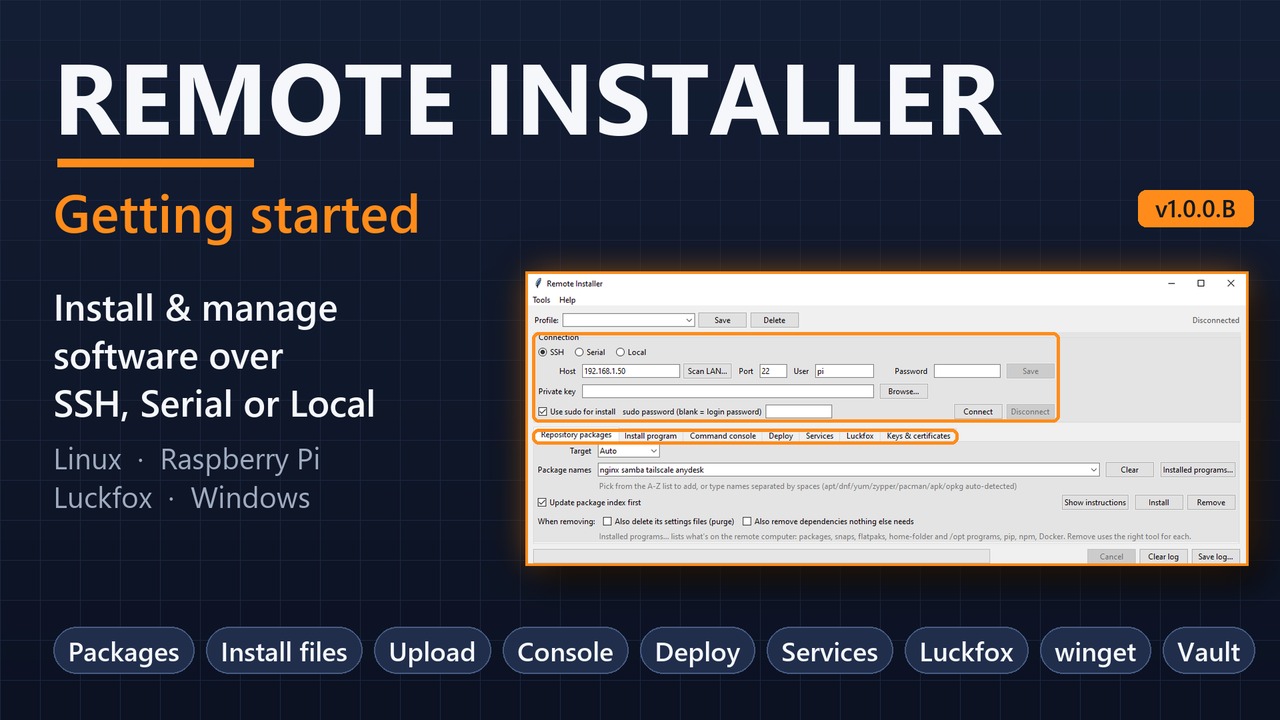
A 5-minute tour: connect to a computer, install packages, upload files, run commands and set up a board.
Watch on YouTubeInstall and manage software on a Linux computer, Raspberry Pi, Luckfox board or Windows PC, from your own computer, over SSH, a serial cable, or locally. No command line needed.
Portable: no installer, no Python, no administrator rights. Published 2026-11-04.
SHA-256: Windows f1865be13fee417d991df53402258333f6c8337e12864b69bd07f16ca049f482, Linux 4c637037e6f7b0cf231df768cc4af6f21d84e570cb55f46d2b719b3b003f7b63.
A 5-minute tour: connect to a computer, install packages, upload files, run commands and set up a board.
Watch on YouTubeOne window, a tab for each job, and a log of everything that ran.
SSH with password or key, a USB-serial cable to a board's console, or this computer itself. Scan LAN finds computers on your network.
Install or remove packages by name with apt, dnf, pacman, apk, opkg ... or winget on Windows. About 80 common packages to pick from.
.deb, .rpm, .sh, .tar.gz, .zip, or .msi and setup .exe on Windows, uploaded and installed in one click.
Send projects, websites and shared files to the right folder, with the right owner and permissions.
Run commands and scripts on the remote computer and see the output in the log.
Samba share, nginx website, Cloudflare Tunnel and Tailscale, one at a time or all at once.
See what's running, start, stop, restart, and choose what starts at boot.
Board info, live monitor, Wi-Fi, USB network, camera and GPIO, even over a serial cable.
Tokens, auth keys and passwords kept encrypted with your master password, and never shown in the log.
Download, start, connect.
chmod +x RemoteInstaller-linux-x86_64./RemoteInstaller-linux-x86_64The full user guide covers every tab, Windows computers, Luckfox boards and troubleshooting. It's also in the program: Help → User guide (F1).